Apple Mac Mini M4 Buying Guide: Specs, Performance and Price in Nepal
21st August, 2026
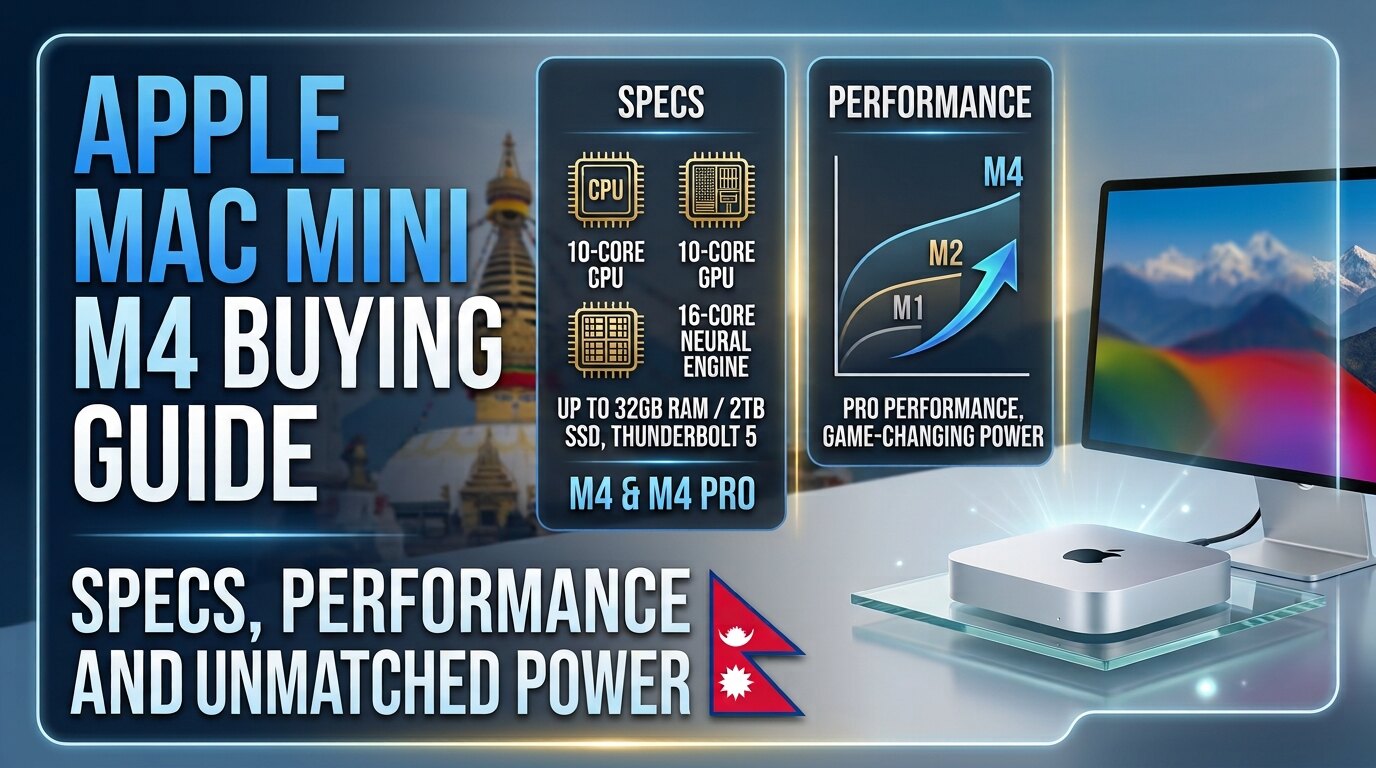
Apple's Mac Mini has always been one of the most interesting computers in the Mac lineup. It offers the macOS experience and Apple Silicon performance in a small desktop computer that can fit almost anywhere on a desk. With the introduction of the M4 generation, the Mac Mini has become an even more attractive option for students, professionals, programmers, content creators, and users looking for a compact but capable desktop setup.
For buyers searching for the Mac Mini Price in Nepal, choosing the right configuration is just as important as checking the price. The Mac Mini does not include a display, keyboard, or mouse, so the total cost of building a complete setup can vary significantly depending on the accessories you choose.
The Apple Mac Mini M4 brings a 10-core CPU, 10-core GPU, 16-core Neural Engine, unified memory, fast SSD storage, Thunderbolt connectivity, and support for multiple high-resolution displays. It is a major step forward from older Intel-based Mac Mini models and offers strong performance while maintaining a very small footprint.
In this complete buying guide, we will explore the Mac Mini M4 specifications, design, performance, memory and storage options, price in Nepal, comparisons with the M4 Pro and Windows desktop PCs, and whether it is the right choice for your needs.
Apple Mac Mini M4 Overview
The Apple Mac Mini M4 is a compact desktop computer powered by Apple's M4 chip. Unlike a traditional desktop PC, it does not come with a monitor, keyboard, or mouse. Instead, users can connect their preferred display and accessories to create a customized workspace.
One of the biggest advantages of the Mac Mini is its size. The redesigned M4 model measures approximately 12.7 cm in width and depth and 5 cm in height, making it significantly smaller than most traditional desktop computers. The standard M4 version weighs around 0.67 kg.
Despite its compact size, the Mac Mini M4 is designed for a wide range of workloads, including:
- Office productivity
- Web browsing
- Programming
- Photo editing
- Video editing
- Graphic design
- Music production
- Content creation
- Multitasking
For users who already own an iPhone, iPad, or other Apple devices, the macOS ecosystem can also be a major advantage.
Mac Mini M4 Specifications
The standard Mac Mini is powered by Apple's M4 chip. It includes a 10-core CPU with four performance cores and six efficiency cores, along with a 10-core GPU and a 16-core Neural Engine. Apple also includes hardware-accelerated ray tracing and a media engine supporting formats such as H.264, HEVC, ProRes, ProRes RAW, and AV1 decoding.
The M4 Mac Mini supports advanced display configurations, including support for high-resolution external monitors. Depending on the setup, it can support up to three displays, while its HDMI and Thunderbolt connections provide flexibility for professional workspaces.
Mac Mini M4 Design and Build Quality
The design is one of the Mac Mini M4's biggest strengths. Apple has created an extremely compact desktop that can easily fit beside a monitor or occupy very little desk space.
The aluminum enclosure gives the computer a premium appearance, while the compact dimensions make it suitable for:
- Home offices
- Small workspaces
- Student desks
- Creative studios
- Business environments
Another benefit is its relatively quiet operation. Apple lists a typical idle sound pressure level of 5 dBA, helping make the Mac Mini suitable for quiet offices and home workspaces.
However, buyers should remember that the Mac Mini is only the computer itself. A complete setup requires additional accessories.
Accessories You May Need
- Monitor
- Keyboard
- Mouse or trackpad
- External storage
- USB hub, if required
- Webcam
- Speakers or headphones
This is an important consideration when calculating the Mac Mini M4 Price in Nepal. A buyer moving from a laptop may need to purchase several accessories, while someone who already owns a monitor and peripherals may find the Mac Mini more cost-effective.
Apple M4 Chip Performance
The M4 chip is the heart of the Mac Mini. Its 10-core CPU combines performance and efficiency cores to balance demanding workloads with energy efficiency.
For everyday tasks, the Mac Mini M4 is more than capable. Web browsing with multiple tabs, Microsoft Office, Google Workspace, video conferencing, streaming, and general multitasking should run smoothly.
The 10-core GPU also provides useful graphics performance for creative applications, photo editing, video work, and compatible games.
The 16-core Neural Engine is designed to accelerate machine learning and AI-related workloads, while the M4 chip provides 120GB/s of memory bandwidth.
Everyday Productivity
The Mac Mini M4 is an excellent choice for:
- Microsoft Word and Excel
- Google Docs and Sheets
- Web browsing
- Online meetings
- Multitasking
- Media consumption
For office users, the base configuration can provide significantly more performance than necessary for basic workloads, making it a good option for users who also expect to handle more demanding tasks in the future.
Mac Mini M4 RAM and Storage Options
Choosing the right memory and storage configuration is extremely important. The base M4 model includes 16GB of unified memory, with higher memory and storage configurations available. Apple's technical specifications list M4 configurations with storage options starting at 256GB and 512GB.
Because internal upgrades are limited compared with a traditional Windows desktop PC, it is important to think about your future requirements before purchasing.
For Students and Basic Users
A standard configuration can be suitable for:
- Office applications
- Online classes
- Research
- Web browsing
- Programming
- Streaming
- General productivity
For Developers and Multitaskers
Consider higher memory or storage if you regularly use:
- Multiple development environments
- Docker containers
- Virtualization tools
- Large projects
- Professional applications
- Numerous applications simultaneously
For Content Creators
Creative professionals working with large files should carefully consider storage and memory requirements. Video projects, RAW photos, large design files, and music production projects can quickly consume storage.
An external SSD can be a practical solution for storing large media libraries, but internal storage should still be sufficient for the operating system, applications, and active projects.The Mac Mini M4 is particularly appealing to developers because macOS provides a Unix-based environment. It can be suitable for:
- Web development
- Software development
- Python programming
- Java development
- JavaScript and Node.js
- Mobile app development
- Terminal-based workflows
- Docker and development tools
For developers who work with Xcode or want to build applications for Apple's ecosystem, a Mac is especially useful.
However, before buying, users should verify that any essential software, development tools, virtual machines, or Windows-specific applications are compatible with macOS and Apple Silicon.
Mac Mini M4 Price in Nepal
The Mac Mini M4 Price in Nepal depends on the memory and storage configuration, retailer, import costs, availability, and warranty coverage.
A Nepal market listing updated in July 2026 listed the 16GB/256GB Mac Mini M4 at approximately NPR 144,900 and the 16GB/512GB version at approximately NPR 174,999. Availability and pricing can change, so buyers should always confirm the latest price and exact configuration before purchasing.
Prices can change depending on the retailer, stock, exchange rates, configuration, import costs, and warranty. The figures above are based on a Nepal market listing updated in July 2026 and should be confirmed with the seller before purchase.
Mac Mini M4 vs Windows Desktop PC
A Mac Mini M4 and a Windows desktop PC serve different types of users.
If you primarily play modern PC games, a Windows gaming desktop with a dedicated graphics card will usually be the better choice.
However, if your priority is a quiet, compact, efficient computer for productivity, programming, and creative work, the Mac Mini M4 can be an excellent option.
Is the Mac Mini M4 Good for Students?
The Mac Mini M4 can be an excellent desktop for students, especially those who already have access to a monitor and accessories.
It can work well for:
- IT students
- Programming students
- Business students
- Design students
- Computer science students
- General academic work
However, there is one major limitation: portability.
Unlike a MacBook or Windows laptop, the Mac Mini must remain connected to a monitor and power source. Students who need to carry their computer to college, university, or other locations may find a laptop more practical.
A Mac Mini setup is most suitable for students who primarily work from a fixed desk or home workspace.
Is Mac Mini M4 Good for Programming?
Yes, the Mac Mini M4 is a strong option for programming and software development.
The combination of Apple Silicon performance and macOS makes it suitable for modern development workflows. Developers can use popular tools such as code editors, terminals, programming languages, containers, and development frameworks.
It can be particularly attractive for developers who:
- Build iOS or macOS applications
- Work with Unix-based tools
- Develop websites
- Write Python, JavaScript, Java, or other languages
- Need a compact desktop development machine
Before purchasing, users should check whether their required enterprise software or Windows-only tools are supported.
Mac Mini M4 for Content Creators
The Mac Mini M4 is also a capable machine for content creation. The M4 chip includes a dedicated media engine with hardware acceleration for H.264, HEVC, ProRes, and ProRes RAW, along with AV1 decoding.
It can be suitable for:
- Adobe Photoshop
- Lightroom
- Final Cut Pro
- Adobe Premiere Pro
- DaVinci Resolve
- Graphic design
- YouTube content creation
- Music production
- Photo editing
The standard M4 should be sufficient for many creators. However, professionals working with complex effects, high-resolution projects, multiple large files, or demanding production workflows may benefit from the additional CPU, GPU, memory bandwidth, and memory capacity offered by the M4 Pro.
Mac Mini M4 for Gaming
Gaming is one area where buyers should manage their expectations.
Apple Silicon has improved Mac gaming performance, and the M4 GPU supports hardware-accelerated ray tracing. However, the availability of games on macOS remains more limited than on Windows.
The Mac Mini M4 can run compatible games, but it should not be considered a direct replacement for a dedicated Windows gaming PC with a powerful NVIDIA or AMD graphics card.
Serious gamers who want access to the widest game library, competitive titles, and extensive hardware upgrade options should consider a Windows gaming desktop.
Who Should Buy the Mac Mini M4?
Buy the Mac Mini M4 If:
The Mac Mini M4 is a good choice if you:
- Already use an iPhone, iPad, or other Apple devices
- Want a powerful compact desktop
- Prefer macOS
- Work with office and productivity applications
- Are a programmer or developer
- Create photos or videos
- Already own a good monitor
- Want a quiet and energy-efficient desktop
Consider Other Options If:
You may want to consider a Windows desktop or laptop if you:
- Need portability
- Primarily play PC games
- Require regular hardware upgrades
- Depend on Windows-only applications
- Need a dedicated high-end graphics card
- Want to build and customize your own PC
What to Check Before Buying Mac Mini M4 in Nepal
Before purchasing a Mac Mini, consider these important points.
1. Choose the Right Memory
Think about the applications you use today and the workloads you may have in the future. Choosing sufficient unified memory at the time of purchase is important.
2. Select Enough Storage
A 256GB SSD may be sufficient for basic users, but developers and content creators can quickly run out of space.
3. Check Your Monitor
Make sure your existing monitor is compatible with the Mac Mini's HDMI or USB-C/Thunderbolt connections.
4. Calculate the Complete Setup Cost
Do not only compare the Mac Mini M4 Price in Nepal. Also calculate the cost of:
- Monitor
- Keyboard
- Mouse
- External SSD
- Adapters or hubs
5. Check Warranty Coverage
Ask the seller about warranty terms and service support before purchasing.
6. Confirm the Exact Configuration
Always verify the RAM and storage configuration. Two Mac Mini models may look identical but have very different specifications and prices.
7. Ask for a VAT Bill
For business users and buyers who require official documentation, confirm whether a VAT bill is available.
8. Compare Trusted Sellers
Compare prices, warranty coverage, and after-sales service from reliable retailers.
9. Consider External Storage
If you work with large media files, an external SSD can be a practical way to expand storage capacity.
10. Think About Future Requirements
Because the Mac Mini is not as upgradeable as a traditional desktop PC, choosing the correct configuration from the beginning is important.
Is the Mac Mini M4 Worth Buying in Nepal?
The Apple Mac Mini M4 is one of the strongest options for users looking for a compact desktop with modern performance. The M4 chip delivers strong CPU and GPU capabilities, while 16GB unified memory in the base configuration makes it suitable for much more than simple office work. Apple's official specifications also include Thunderbolt 4, Wi-Fi 6E, Bluetooth 5.3, multiple display support, and advanced media capabilities.
For students, office professionals, programmers, and many content creators, the standard M4 offers an excellent balance between performance and cost. The M4 Pro is more suitable for demanding professional workloads where additional CPU, GPU, memory bandwidth, and memory capacity can make a meaningful difference.
The biggest factor for Nepalese buyers is the total cost of ownership. When comparing the Mac Mini M4 Price in Nepal, remember that you may also need to purchase a monitor and accessories.
If you already have a good monitor and prefer macOS, the Mac Mini M4 can be an excellent long-term desktop investment. On the other hand, gamers and users who require extensive hardware upgrades may find a Windows desktop PC more suitable.
Frequently Asked Questions
Is the Mac Mini M4 worth buying in Nepal?
Yes, it can be worth buying if you need a compact, powerful, and efficient desktop for productivity, programming, and creative work. It is particularly attractive if you already own a monitor and other accessories.
Does the Mac Mini M4 come with a monitor?
No. The Mac Mini package includes the computer and power cord, but users need to purchase or connect their own monitor, keyboard, and mouse.
Can I upgrade the RAM on the Mac Mini M4 later?
Buyers should carefully choose their memory configuration when purchasing because the Mac Mini does not offer the same user-upgradeable RAM flexibility as a typical desktop PC.
Is the Mac Mini M4 good for programming?
Yes. The Mac Mini M4 is suitable for web development, software development, coding, and many professional development workflows. It is also useful for developers who need macOS for Apple application development.
Is the Mac Mini M4 good for video editing?
Yes. It can handle many video editing workloads and includes a media engine with hardware acceleration for several professional video formats. Users with especially demanding workflows may benefit from the M4 Pro.
Can the Mac Mini M4 be used for gaming?
Yes, compatible macOS games can be played, but the Mac Mini M4 is not the best option for users who primarily play PC games. Windows gaming PCs generally offer a wider game library and more graphics hardware choices.
Which is better: Mac Mini M4 or Mac Mini M4 Pro?
The standard M4 offers better value for most users, while the M4 Pro is designed for heavier professional workloads. Your choice should depend on your software, workload, memory requirements, and budget.
Is the Mac Mini M4 suitable for students?
Yes, especially for students who work from a fixed desk. However, students who need portability may find a MacBook or Windows laptop more practical.
Related Blogs

Samsung Galaxy Z Fold8 Ultra, Z Fold8 & Z Flip8: Specifications, Features and Complete Comparison 2026
24th July, 2026
Gaming Laptop Price in Nepal (2026): Complete Detailed Guide, Latest Prices, Specs & Buying Advice
30th June, 2026
NVIDIA RTX Spark Full Specifications
15th June, 2026
Samsung S27 Price in Nepal, Expected Launch and Full Specifications
9th June, 2026
MacBook Air M5: Apple’s Most Popular Macbook Gets a Big Upgrade
13th March, 2026
iPhone 17e: Apple’s Most Affordable A19-Powered iPhone Yet
11th March, 2026
Everything you need to know about Samsung S26 Series
10th March, 2026
MacBook Neo: The Perfect Balance Between Power and Price
9th March, 2026

Detailed Guide On Earbuds, Explore, Choose and Buy
26th February, 2026