Apple Mac mini M6 in Nepal: Price, Features, Performance & Is It Worth Buying in 2026?
23rd November, 2026
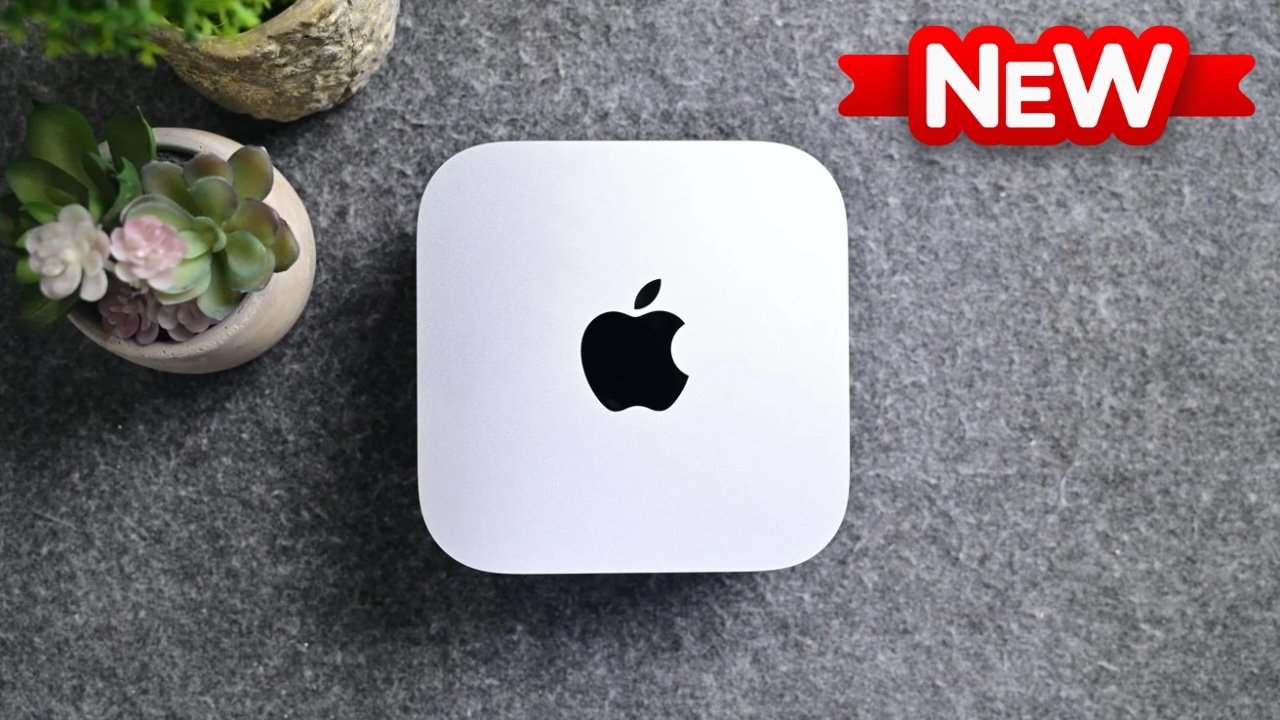
Apple has consistently changed the desktop computing experience with its powerful Apple Silicon processors, and the latest Apple Mac mini M6 continues that direction. Designed for users who need powerful computing performance without a large desktop tower, the Mac mini M6 combines advanced processing capabilities, improved graphics, AI acceleration, and a compact design.
For Nepali users, the Apple Mac mini M6 is an interesting option for students, software developers, graphic designers, video editors, business professionals, and content creators who want a powerful desktop computer for their everyday work. Its compact footprint makes it particularly useful for people working with limited desk space at home, in offices, or in creative studios.
Unlike traditional desktop computers, the Mac mini does not include a monitor, keyboard, or mouse. Instead, users can connect their preferred accessories and create a personalized workstation according to their requirements and budget.
But is the new Mac mini M6 worth its price in Nepal? How powerful is the M6 chip? Which storage and memory configuration should you choose? And can it replace a traditional desktop PC or MacBook?
In this guide, we explore everything you need to know about the Apple Mac mini M6, including its specifications, performance, features, practical applications, and buying considerations in Nepal.
Apple Mac mini M6 Price in Nepal
The Apple Mac mini M6 is available in multiple configurations, allowing buyers to select the memory and storage capacity that best suits their needs.
In Nepal, the available configurations and indicative prices are:
The 16GB/256GB configuration is a suitable starting point for everyday productivity, office applications, web browsing, and general professional use. The 16GB/512GB version provides additional storage for users who manage larger files, while the 24GB/512GB configuration is worth considering for heavier multitasking and creative workflows.
When choosing a Mac mini, remember that unified memory is integrated into the system and is not designed for conventional user upgrades. Therefore, selecting the right configuration before purchasing is important.
Key Features of Apple Mac mini M6
1. Powerful Apple M6 Chip
The Apple M6 chip is the main highlight of the latest Mac mini. It features a 12-core CPU consisting of two super cores, four performance cores, and six efficiency cores.
This architecture balances demanding workloads with everyday computing efficiency. Users can run multiple applications, manage large projects, work with creative software, and switch between tasks without constantly experiencing performance limitations.
Apple claims that the M6 delivers up to 40% faster CPU performance compared with the previous-generation M4 Mac mini. This makes it an interesting upgrade for users who need better processing capabilities for professional work.
2. Improved 12-Core GPU Performance
Graphics performance is another important part of the Mac mini M6 experience. The integrated 12-core GPU is designed to handle graphics-intensive applications, visual projects, and supported gaming workloads.
The GPU also includes Neural Accelerators in each core and hardware-accelerated ray tracing. These technologies help improve graphics processing and AI-related workloads.
For Nepali graphic designers, video editors, and digital creators, this means a compact desktop that can handle many demanding creative applications without requiring a separate dedicated graphics card.
3. Advanced Neural Engine for AI Workloads
Artificial intelligence is becoming increasingly important in modern computing. Apple has equipped the M6 chip with a dual 16-core Neural Engine to accelerate supported machine-learning and AI tasks.
The Neural Engine works alongside the GPU to handle compatible AI operations efficiently. Users working with supported AI applications, image processing, voice recognition, and local machine-learning tools can benefit from this dedicated processing capability.
The inclusion of Neural Accelerators also makes the Mac mini M6 more suitable for emerging AI workflows.
4. Faster Unified Memory
The Mac mini M6 comes with 16GB of unified memory as its starting configuration, with options to upgrade to 24GB or 32GB.
Unlike traditional desktop computers that use separate system RAM and graphics memory, Apple Silicon uses unified memory shared across the CPU and GPU.
This architecture allows different components to access the same memory pool efficiently, supporting smoother multitasking and creative workflows.
For users in Nepal, choosing between 16GB and 24GB depends on how they plan to use their computer.
- 16GB RAM: Suitable for students, office professionals, web browsing, programming, and everyday productivity.
- 24GB RAM: Better for heavier multitasking, creative applications, and larger projects.
- 32GB RAM: Worth considering for more demanding workflows where additional memory is beneficial.
One important consideration is that unified memory is not user-upgradeable after purchase. Therefore, it is better to select the right memory configuration from the beginning.
5. Compact and Minimalist Design
One of the most recognizable features of the Mac mini is its compact aluminum design. The M6 generation continues this space-saving approach, measuring approximately five inches in width and depth.
Its small footprint allows users to place it beside a monitor, under a desk, or in a dedicated workstation without occupying much space.
For people living or working in Kathmandu, where desk space can sometimes be limited, this compact design offers a practical advantage.
Despite its small size, the Mac mini M6 delivers desktop-class performance, making it suitable for home offices, educational institutions, business environments, and creative studios.
6. Modern Connectivity and Multiple Display Support
The Mac mini M6 offers several connectivity options for modern desktop setups.
Its connectivity includes:
- Three Thunderbolt 4 USB-C ports
- Two front USB-C ports
- HDMI port
- 2.5Gb Ethernet
- Optional 10Gb Ethernet configuration
- Wi-Fi 7
- Bluetooth 6
- 3.5mm headphone jack
Another major advantage is its support for up to three external displays, depending on the supported resolution and refresh-rate combinations.
This is useful for programmers who work with multiple windows, financial professionals who manage different dashboards, and content creators who need additional screen space.
Apple Mac mini M6 Performance: What Can You Do With It?
The Mac mini M6 is not simply a compact computer for browsing and office work. Its upgraded processor, graphics capabilities, and AI acceleration make it suitable for different professional and personal applications.
Let's explore how it performs for different types of users in Nepal.
Mac mini M6 for Students
Students looking for a reliable desktop for college assignments, research, online classes, presentations, and programming can consider the Mac mini M6.
It can comfortably handle everyday student workloads, including:
- Microsoft Office applications
- Google Workspace
- Web research and browsing
- Online meetings and classes
- Presentation creation
- Programming and coding
- PDF reading and document management
For students studying computer science, information technology, business, or other professional subjects, the Mac mini M6 provides a capable computing platform.
However, students who frequently travel between college, home, and other locations may prefer a laptop because the Mac mini requires an external monitor and continuous power connection.
If portability is important, explore the available MacBook models in Nepal before making your decision.
Mac mini M6 for Programming and Software Development
Software developers need a computer that can handle multiple applications, coding environments, testing tools, and development workflows.
The Mac mini M6 is suitable for programming languages and development environments such as:
- Python
- Java
- JavaScript
- Swift
- C and C++
- Web development tools
- Xcode and compatible development environments
Its multi-core CPU and unified memory support multitasking across code editors, browsers, terminals, and development tools.
For developers working on iOS and macOS applications, a Mac is particularly useful because Apple's Xcode development environment requires macOS.
The ability to connect multiple external displays also helps developers maintain separate screens for code, documentation, terminals, and testing.
Mac mini M6 for Graphic Designers
Graphic designers require reliable processing performance, responsive applications, and sufficient memory for handling large creative projects.
The Mac mini M6 can support compatible professional applications such as:
- Adobe Photoshop
- Adobe Illustrator
- Adobe InDesign
- Affinity Designer
- Figma
- Canva
Whether you are designing social media posts, business branding, promotional materials, or digital illustrations, the M6 platform offers a capable environment for creative work.
Designers working with larger projects and multiple applications should consider the 24GB memory configuration for additional multitasking flexibility.
Mac mini M6 for Video Editing and Content Creation
Video editors and content creators can also benefit from the M6 chip's processing and media capabilities.
The Mac mini M6 includes hardware acceleration for H.264, HEVC, ProRes, and ProRes RAW, making it suitable for compatible video editing workflows.
It can be used with applications such as:
- Final Cut Pro
- Adobe Premiere Pro
- DaVinci Resolve
- CapCut
- Adobe After Effects
For YouTubers, social media creators, marketing professionals, and freelance video editors in Nepal, the Mac mini M6 can serve as a compact editing workstation.
However, the best experience depends on the video resolution, project complexity, effects, and software requirements. Users regularly handling demanding 4K projects, complex effects, or large media libraries should consider additional memory and storage or an external SSD.
Mac mini M6 for Office and Business Professionals
The Mac mini M6 can also be an excellent option for offices and businesses that need a compact yet capable desktop.
It supports everyday professional workloads, including:
- Accounting and financial applications
- Document creation and management
- Business communication
- Online meetings
- Project management
- Web-based business applications
- Data analysis and spreadsheets
Its compact design makes it suitable for reception desks, workstations, administrative departments, and home offices.
For businesses in Nepal looking to create a modern workstation without purchasing a bulky desktop tower, the Mac mini M6 is worth considering.
Mac mini M6 16GB/256GB vs 16GB/512GB vs 24GB/512GB: Which Should You Buy?
Choosing the correct Mac mini configuration is important because memory and internal storage cannot be upgraded like conventional desktop components.
Here is a comparison of the three configurations available in the Nepal market.
Mac mini M6 16GB/256GB: This is the entry-level configuration and a sensible option for users who primarily need a computer for browsing, office work, studies, and everyday productivity. It is also suitable for users comfortable storing larger files on external SSDs or cloud storage.
Mac mini M6 16GB/512GB: If you regularly install applications, save documents, and work with larger files, the 512GB configuration offers more flexibility. It is a balanced choice for many professionals.
Mac mini M6 24GB/512GB: This configuration is suitable for users who frequently work with several demanding applications, creative projects, and larger workloads. The additional unified memory can be useful for long-term professional use.
For most general users, 16GB is a reasonable starting point. However, if your budget allows and your workload demands additional memory, the 24GB version is a better option to consider.
Mac mini M6 vs MacBook: Which Should You Buy in Nepal?
One common question among Apple buyers in Nepal is whether to purchase a Mac mini or a MacBook.
Both offer the Apple Silicon experience, but they are designed for different types of users.
The Mac mini M6 is a better choice if you already have a monitor and accessories or prefer working from a fixed workstation.
A MacBook is more suitable if you travel frequently, attend college, work remotely from different locations, or need a computer that you can carry easily.
What Do You Need to Complete Your Mac mini M6 Setup?
One important thing to understand before purchasing the Mac mini M6 is that it is not an all-in-one computer.
Unlike an iMac or MacBook, the Mac mini does not come with a built-in display, keyboard, or mouse. You need to purchase these accessories separately or use compatible accessories you already own.
Here are the essential accessories for building a complete workstation.
1. Monitor
A good monitor is essential because the Mac mini requires an external display.
Depending on your work, you can choose between:
- Full HD monitors for everyday office work
- QHD monitors for productivity and multitasking
- 4K monitors for detailed creative work
- High-refresh-rate monitors for smoother visuals
If you are a designer or video editor, a high-resolution display with good colour reproduction can improve your overall working experience.
Explore Monitor Price in Nepal Category to find a display suitable for your Mac mini setup.
2. Keyboard and Mouse
You will also need a keyboard and mouse to operate the Mac mini.
Apple's Magic Keyboard and Magic Mouse provide a seamless experience with macOS. However, compatible third-party Bluetooth and USB keyboards and mice can also be used.
For an Apple-focused setup, consider the Apple Magic Mouse.
3. External SSD for Additional Storage
The Mac mini M6 offers fast internal SSD storage, but users who regularly handle large video files, photographs, and project documents may need additional storage.
An external SSD is useful for:
- Video editing projects
- Photography libraries
- Large business documents
- Backup files
- Software development projects
External storage is a practical way to expand your workspace without relying entirely on internal storage.
4. USB-C Hub and Accessories
Depending on your workstation requirements, a USB-C hub or docking solution can help connect additional accessories.
This is useful if you regularly connect external storage devices, cameras, card readers, and other peripherals.
Before purchasing a hub, check its compatibility with your Mac mini and the bandwidth required by your connected devices.
Is Apple Mac mini M6 Worth Buying in Nepal in 2026?
The Apple Mac mini M6 is worth considering if you want a powerful, compact desktop with modern Apple Silicon performance.
For Nepali buyers, its biggest advantages are its processing capabilities, small footprint, multiple display support, and compatibility with professional applications.
It is particularly suitable for people who spend most of their working hours at a desk and want a reliable workstation for several years.
However, its price is an important consideration. The initial purchase is not the only expense because you may also need a monitor, keyboard, mouse, and additional storage.
Here are some reasons why the Mac mini M6 could be worth purchasing:
- You want a powerful desktop without a large CPU tower.
- You prefer the macOS operating system.
- You regularly use creative and productivity applications.
- You need a computer for programming and development.
- You want a multi-monitor workstation.
- You already own a compatible monitor and peripherals.
- You are interested in Apple's latest AI-focused computing capabilities.
However, it may not be the best choice if you need a portable computer, frequently upgrade hardware, or primarily play demanding PC games.
Ultimately, the Mac mini M6 is a strong option for users who value compact design, desktop performance, and the Apple ecosystem.
Where to Buy Apple Mac mini M6 in Nepal?
If you are planning to purchase the Apple Mac mini M6 in Nepal, choosing a reliable technology retailer is important. Buyers should consider product authenticity, warranty support, pricing, and after-sales service before making a purchase.
At Zolpa Store, customers can explore Apple products and different computer solutions according to their requirements.
Whether you are looking for a compact desktop for office productivity, a creative workstation for professional projects, or a powerful computer for programming, Zolpa helps you explore suitable technology options.
You can also explore other Apple products through the Apple Products Price in Nepal category.
Zolpa Store is based in Kathmandu and provides delivery services across Nepal, allowing customers from different cities and regions to order products conveniently.
When purchasing your Mac mini, consider checking the following:
- Confirm the exact M6 processor and configuration.
- Compare 16GB and 24GB unified memory options.
- Check the available SSD storage.
- Confirm the applicable warranty and VAT bill.
- Ask about current offers and payment options.
- Check delivery availability for your location.
Choosing the right configuration and a reliable retailer will help you get better value from your investment.
Frequently Asked Questions (FAQs)
Is the Mac mini M6 good for students in Nepal?
Yes. The Mac mini M6 is suitable for students who need a desktop for assignments, online classes, research, presentations, programming, and everyday productivity. However, students who need portability may prefer a MacBook.
Does the Apple Mac mini M6 come with a monitor?
No. The Mac mini M6 does not include a monitor, keyboard, or mouse. These accessories must be purchased separately or connected from an existing setup.
Can I use the Mac mini M6 for video editing?
Yes. The Mac mini M6 supports professional video editing workflows through applications such as Final Cut Pro, Adobe Premiere Pro, and DaVinci Resolve. Its hardware-accelerated media engines support formats including ProRes, H.264, and HEVC.
Is 16GB RAM enough for Mac mini M6?
For everyday productivity, office work, web browsing, programming, and general multitasking, 16GB unified memory is a good starting point. Users working with larger creative projects and demanding applications may benefit from 24GB or 32GB.
Can the Mac mini M6 run Windows?
The Mac mini M6 does not support traditional Boot Camp installation like older Intel-based Macs. Windows-based workflows may be possible through virtualization software or remote desktop solutions, subject to compatibility and performance limitations.
Is the Mac mini M6 suitable for gaming?
The Mac mini M6 can run compatible macOS games and supported gaming applications. However, it is not a direct replacement for a dedicated Windows gaming PC, particularly for users who want extensive game compatibility.
Can I upgrade the RAM and SSD later?
The unified memory is integrated into the system and cannot be upgraded by users after purchase. Internal SSD upgrades are also not intended as conventional user upgrades. It is recommended to select the appropriate configuration when buying.
Related Blogs
DJI Gimbals in Nepal: Professional Gimbals vs Smartphone Gimbals – Which One Should You Buy?
4th November, 2026
Lenovo LOQ 27Q-10 Monitor for Gaming, Streaming and Everyday Productivity
29th October, 2026

Best Laptop for Accounting in Nepal 2026: Top Picks for Accountants and Students
15th October, 2026

Best Laptop for Students in Nepal 2026: Top Picks for Every Budget
14th October, 2026

Best Laptop for Video Editing in Nepal 2026: Top Picks for YouTubers, Creators and Professionals
12th October, 2026

Best Laptop for Programming in Nepal 2026: Top Picks for Students and Developers
11th October, 2026

Dell vs HP Laptop: Which Is Better to Buy in Nepal?
10th October, 2026

MacBook Air vs Windows Laptop: Which Is Better to Buy in Nepal?
9th October, 2026

ASUS TUF Gaming vs Lenovo LOQ: Performance, Price and Features Compared
9th October, 2026